

Introducing Notamify's List View: A Decluttered Approach to NOTAM Management
1/11/2025
When pilots are working with 150+ pages of briefing documents per flight, finding critical information becomes like searching for a needle in a haystack. A recent analysis showed that the average international flight briefing package contains over 250 NOTAMs, with many being irrelevant to the actual flight time or operations. This information overload isn't just inconvenient – it's a serious safety concern.
The Problem with Traditional NOTAM Displays
Traditional NOTAM briefings often present information in dense, hard-to-scan formats:
- Walls of text with no visual hierarchy
- Mixed critical and non-critical information
- No clear categorization or prioritization
- Limited filtering capabilities
Introducing the New List View
Our new List View tackles these challenges head-on with a completely redesigned interface focused on clarity and efficiency. Here's what makes it special:
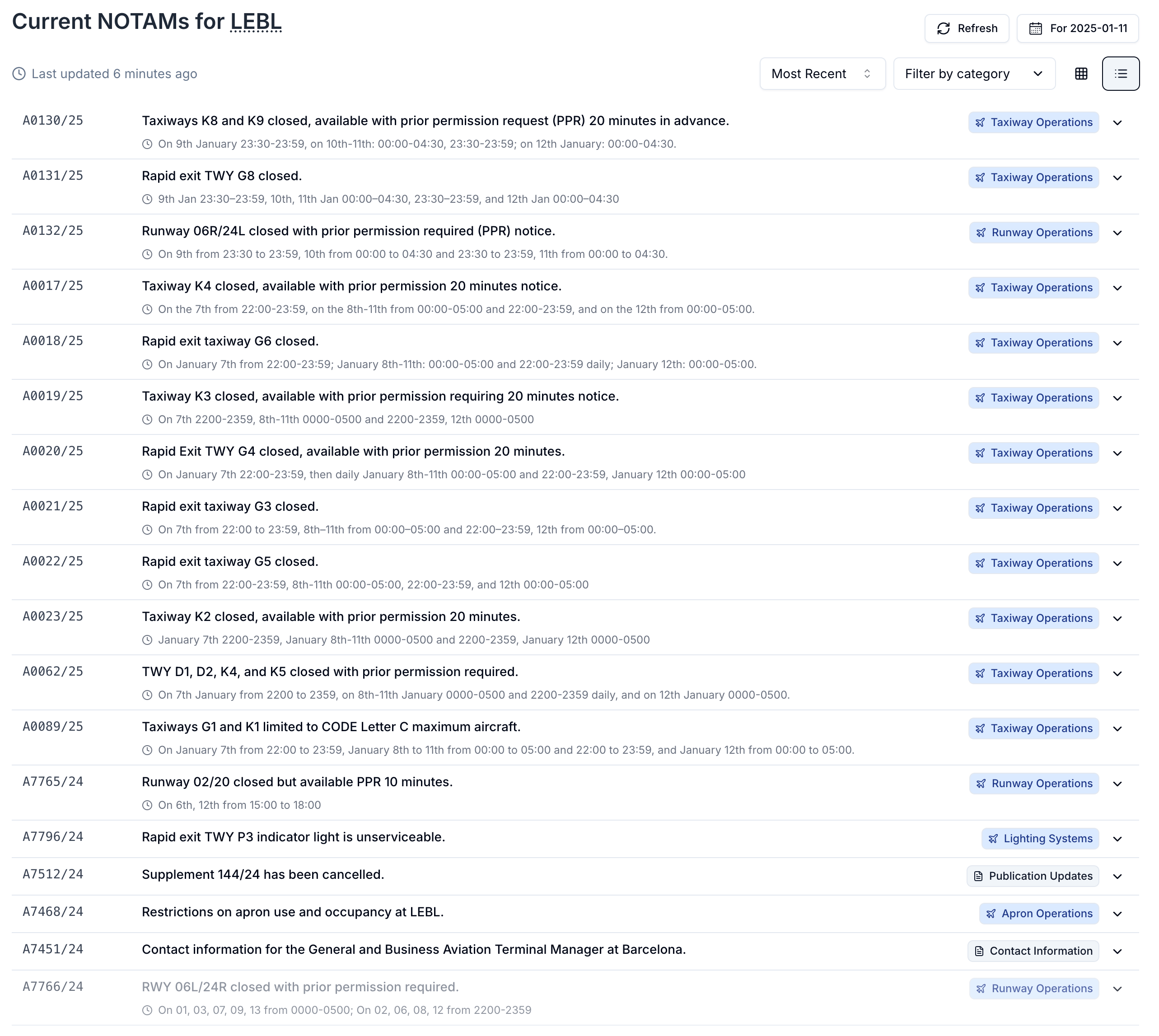
1. Clear Visual Hierarchy
- It allows to quickly scan through the list and find the most important NOTAMs
- The same NOTAM time and category filters are available
- Color-coded categories for quick scanning
- Important details immediately visible
- Expandable entries for additional information
2. Smart Categorization
- Automatic grouping by operational impact
- Visual indicators for NOTAM type
- Quick-filter buttons for common categories
- Timeline integration for temporal context
3. Decluttered Interface
- Focus on essential information
- One-line previews for quick scanning
- Expandable details on demand
- Clear separation between different types of NOTAMs
Real-World Impact
Our beta testers have highlighted the cleaner, more visual approach to scanning through NOTAMs. The combination of date/time filtering and category organization has significantly improved their confidence in not missing critical information during flight preparation.
What It Shows
The List View presents NOTAMs in a scannable format:
-
Priority Sorting
- Critical safety NOTAMs at the top
- Time-sensitive items highlighted
- Operational impacts clearly marked
-
Smart Filtering
- Filter by category with one click
- Time-based filtering for your flight window
- Quick search across all fields
-
Visual Aids
- Icons indicating NOTAM type
- Progress bars for validity periods
- Status indicators for active/upcoming NOTAMs
Additionally, the system automatically saves selected view preference to enable quick access to the most relevant NOTAMs.
Try It Yourself
Ready to experience a clearer way to manage NOTAMs? The new List View is available now to all Notamify users. Try it today →
This feature was made possible by our beta testers! Do you also want to help shape the future of NOTAM management? Join our beta program and get early access to new features while helping us make aviation safer and more efficient.

Read more...
Track Starship NOTAMs and Restrictions
9/27/2026
Explore Starship launch restrictions, route closures and re-entry NOTAMs on one map, with notices grouped by airport and flight information region.
Faster Flight Briefings and Automatic Airport Summaries
9/25/2026
Flight briefings now generate 47% faster with improved accuracy. Airport summaries take around few seconds, with a new Auto option for airport pages.
4 Million NOTAMs: What Happens After an Airport Closes
9/12/2026
A review of airport closures, changing airspace restrictions and the information available to flight operations teams in Notamify’s archives.
NOTAM App for Pilots on iPhone and iPad
7/24/2026
Notamify is a NOTAM app for iPhone and iPad with clear interpretations, runway and taxiway maps, flight briefings, offline access, and swipe review.